Email#
The Email node sends an email to one or more recipients.
Settings#
- To: The recipient email address(es) — can be a fixed value or flow variable
- From: The sender address (optional)
- Subject: The email subject line — can contain flow variables
- Message: The email body — can contain flow variables and HTML formatting
- Attachments: Optionally attach files (e.g. documents, generated reports or photos) — see Attachments
- Ignore empty placeholders: If checked, placeholders with no value are removed from the message rather than shown as empty
- Ignore empty attachments: If checked, empty attachment values are skipped
Attachments#
Each attachment row takes one flow variable. Two variable types are accepted:
| Variable type | What gets attached |
|---|---|
| File | The single file the variable points to, e.g. a generated document or the (First File) of a Camera, Upload or Audio element |
| Table | Every file contained in the table, in row order. Cells that are not files are ignored |
To attach all photos taken with a Camera element, use its (All Files) variable instead of (First File). The same works for the (All Files) variable of Upload and Audio elements and for any other table with a file column, e.g. one produced by the Table Generation node.
If several attached files share the same name (many phones call every photo image.jpg), the duplicates are numbered: image.jpg, image (2).jpg, image (3).jpg.
Very long file names, for example a report named after a whole task description, are shortened to 250 characters. The file extension is kept, so the attachment still opens with the right program.
An empty table counts as an empty attachment: with Ignore empty attachments checked it is skipped, otherwise the node fails.
Table Variable Alignment#
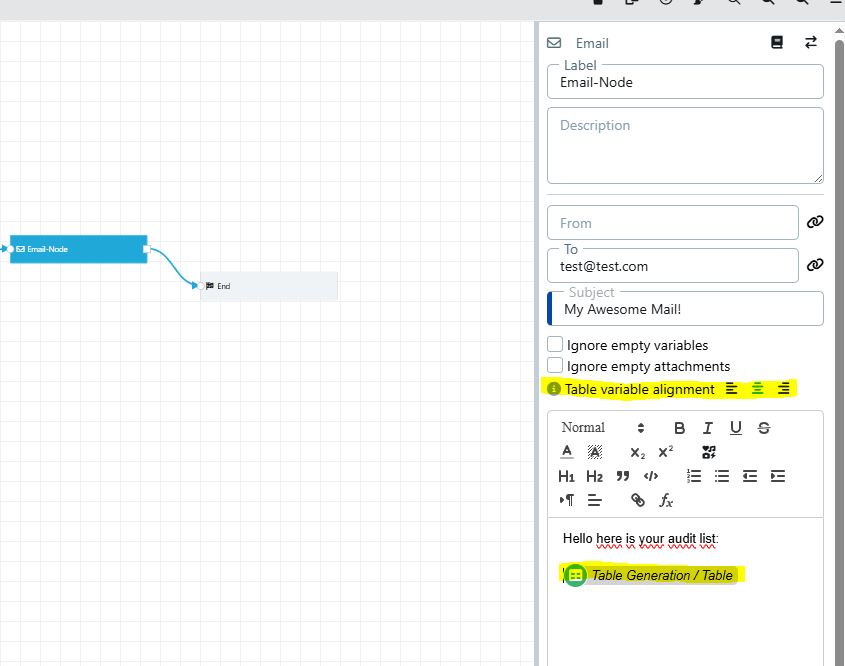
When inserting a variable of type Table into the email message content, you can control how the rendered table columns and values are aligned. The alignment option is available in the variable settings of the Email node.
The following alignment options are supported:
| Option | Description |
|---|---|
| Left | Aligns all table column headers and cell values to the left (default) |
| Center | Centers all table column headers and cell values |
| Right | Aligns all table column headers and cell values to the right |
Below you can see the alignment settings at the Email node and an example of the resulting email with Center alignment applied:

Multiple Recipients#
You can send an email to multiple recipients by separating their email addresses with a comma, e.g.
person1@mail.com,person2@mail.com
Using Variables#
If you want to send an email using variables, you can use the Text Resolver node to combine email addresses, e.g.
"Tobias Wagner / Email", person2@mail.com, "Marta Schmidt / Email"
See Flow Designer